
Locations
Understanding datacenter locations and how to choose the right one.
When configuring your product, the first step is selecting a location. This determines where your application is hosted.
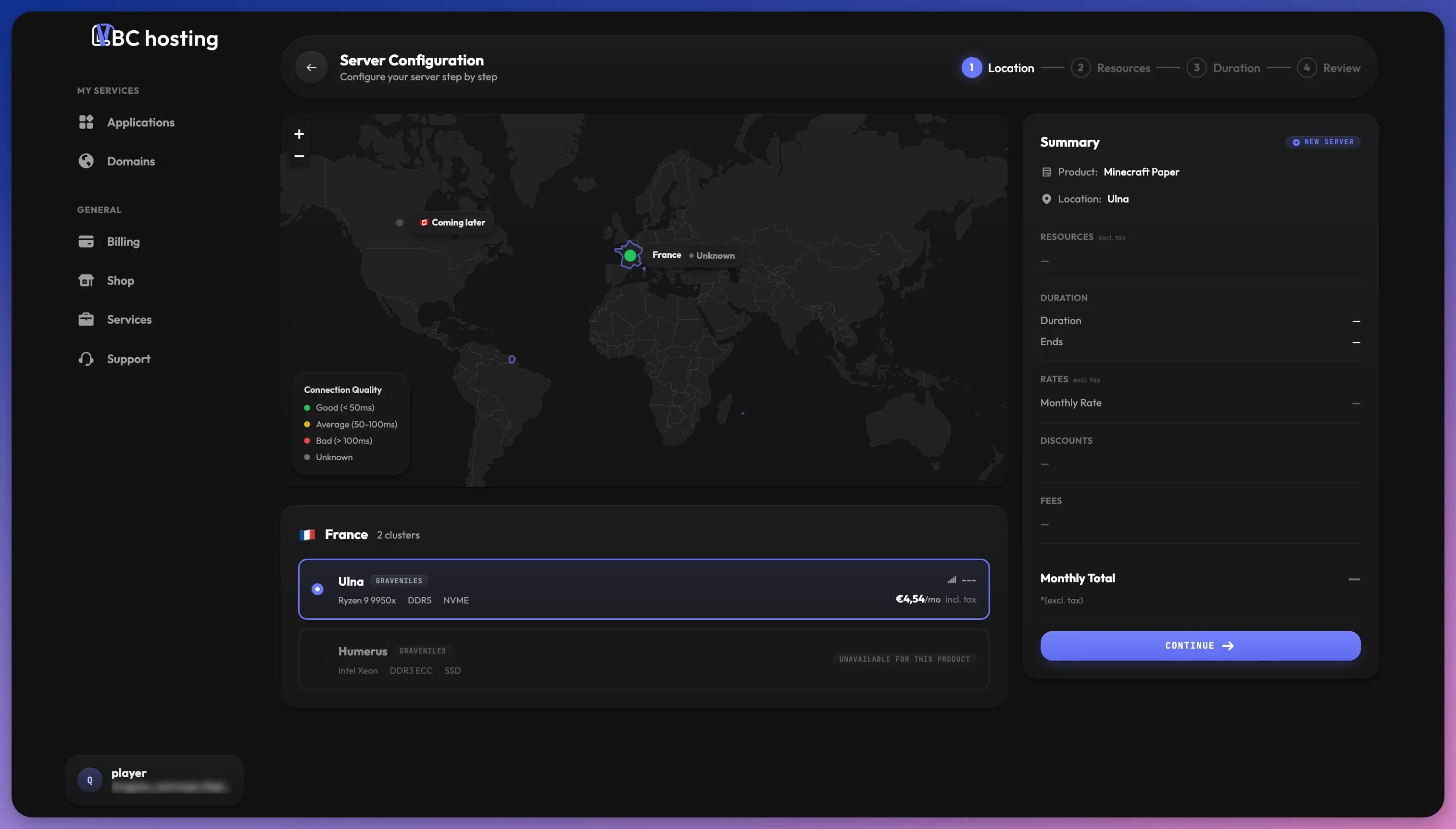
What is a Location?
A location is a server cluster, a group of servers with the same specifications in a specific geographic area. Each has its own geographic position, hardware, and pricing, covered in the sections below.
Choosing a Location
Connection Quality
The map shows your connection quality to each location. Green indicates good latency (under 50ms), yellow is medium (50-100ms), and red means high latency (over 100ms). Gray means the connection couldn't be measured.
Choose a location close to your users for the best experience, whether that's your players for game servers or your audience for websites. For bots or background services, latency matters less, so focus on specs and price.
Hardware
Each location displays its CPU model, RAM type (e.g., DDR5), and storage technology (e.g., NVMe). CPU-intensive applications like busy game servers benefit from faster processors. Memory-intensive applications like databases need good RAM. Storage-intensive applications benefit from NVMe drives.
Availability
LBC only shows locations compatible with your selected product, so if a location doesn't appear, that product isn't available there yet. Available locations may still show "Out of Stock" if resources are fully allocated, in which case choose a different location or check back later.
Pricing
Prices vary between locations based on hardware costs, datacenter fees, and regional operating costs.