
Collaborators
Learn how to manage collaborators on your server and share access with team members
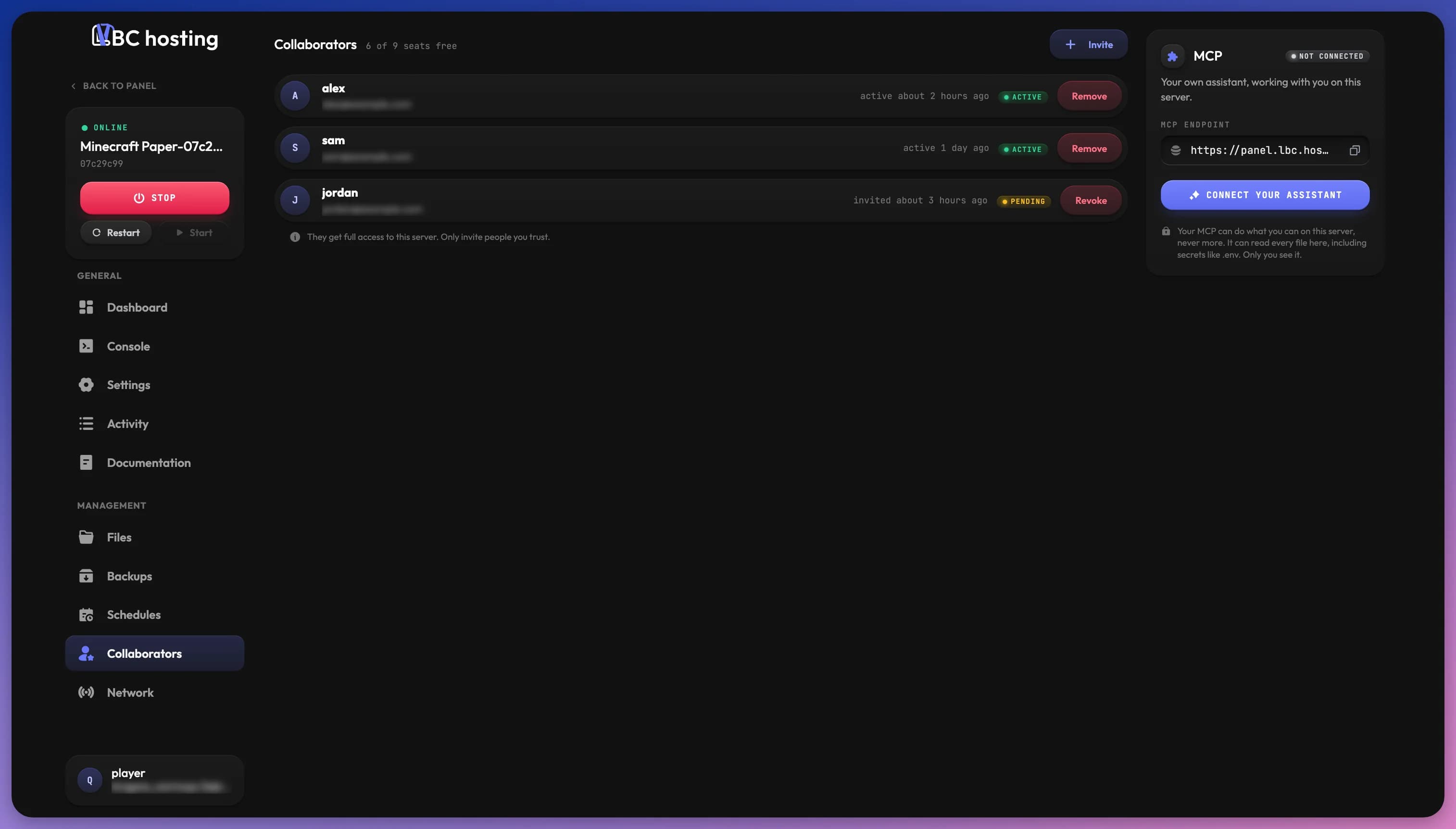
The Collaborators feature allows you to share server access with teammates, friends, or other administrators who need to help manage your server.
Managing Collaborators
On the Collaborators page, you can view all users who have access to your server, revoke their access, or add new collaborators. Only the server owner can invite or remove collaborators.
The top of the page shows how many collaborator seats are free, for example 9 of 9 seats free.
Adding Collaborators
To add a user as a collaborator:
- Click Invite at the top of the page
- Enter their email address (must have an LBC account created on the store)
- Click Send invite. The user will receive an email invitation to join your server
- They have 24 hours to accept the invitation
- You can revoke pending invitations at any time
The Invite button is disabled once every seat is used. You can send up to 10 invitations per hour for a server.
The person you want to add must already have an LBC account created on the store. If they don't, ask them to sign up first before you send the invitation.
Collaborator Cards
Each collaborator appears as a card with their name, their email address (blurred until you hover it) and a status badge:
| Status | Meaning |
|---|---|
| Pending | The invitation was sent and has not been accepted yet. Hover the badge to see when it expires. |
| Expired | The invitation was not accepted within 24 hours. |
| Active | The collaborator accepted and has access to the server. |
| Staff | A temporary staff member assisting with your support ticket. |
Next to the badge, the card shows when the person was invited, or when an active collaborator was last active.
The button on the right of each card depends on its status:
- Revoke cancels a pending or expired invitation, so it can no longer be accepted
- Remove takes access away from an active collaborator right away
- Leave appears on your own card when you are a collaborator
Collaborators will be notified by email when they are removed from a server.
Collaborator Access
Collaborators get full access to the server, the same for everyone. There are no per collaborator permissions to configure.
Collaborators can start, stop and restart the server, use the console, files, schedules, network and settings, and run Repair or Reinstall from the dashboard.
Collaborators cannot:
- Invite or remove other collaborators
- Access backups
- Change the server plan. Manage Plan is greyed out for them, and the store only lets the owner change it
- Cancel or delete the server, which only the owner can do from the store
Server Sharing Indicators
When a server is shared with you:
- It appears in your dashboard server list
- A special icon on the server card indicates it's a shared server
- This visually differentiates shared servers from ones you own
Removing Yourself as a Collaborator
To leave a server you've been added to:
- Go to the Collaborators tab in the server panel
- Click the Leave button on your card
- Confirm with Leave server
You lose access to the server right away. If you receive unwanted invitations, please contact our support.
AI assistant (MCP)
The MCP card on the right of the Collaborators page lets you connect your own AI assistant to the server. Once connected, you can ask it in plain language to start the server, run a console command, edit a config file, or set up a scheduled task, and it performs the action in the panel for you.
The connection uses the Model Context Protocol (MCP), an open standard that AI applications use to talk to external tools. Any assistant that supports MCP works. The setup block comes ready for Claude Desktop, Cursor, VS Code and Claude Code.
Your MCP can do what you can on this server, never more. It can read every file on the server, including secrets like .env files. Only you see your MCP on the page.
Status
The badge at the top of the card shows where your MCP stands on this server:
| Status | Meaning |
|---|---|
| Not connected | You have not connected your assistant to this server. |
| Waiting for your assistant | The MCP is set up, but your assistant has not used it yet. |
| Active | Your assistant used it in the last 15 minutes. |
| Connected | Your assistant has used it before, but not in the last 15 minutes. |
Connecting Your Assistant
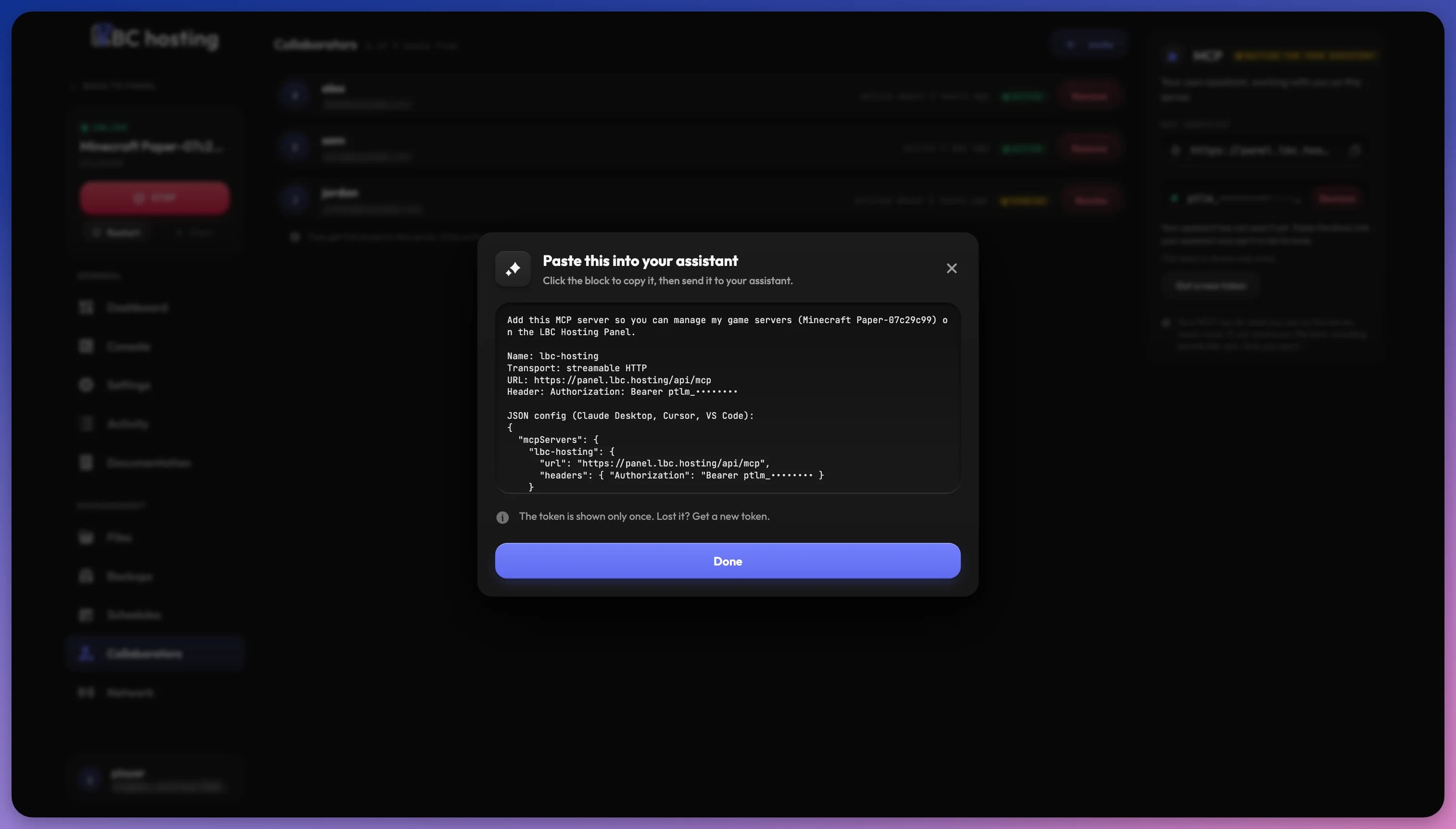
- On the MCP card, click Connect your assistant.
- Confirm with Connect assistant. The assistant acts on this server as you.
- The Paste this into your assistant dialog opens. Click the block to copy it.
- Send the block to your assistant, then click Done.
- Ask your assistant to list its tools. If it can name them, the connection works.
The block contains everything your assistant needs to set itself up:
- The name
lbc-hosting - The transport, streamable HTTP
- The URL
https://panel.lbc.hosting/api/mcp - An
Authorization: Bearerheader with your token - A JSON config for Claude Desktop, Cursor and VS Code
- A command for Claude Code:
claude mcp add --transport http lbc-hosting https://panel.lbc.hosting/api/mcp --header "Authorization: Bearer <token>"
The card also shows the MCP endpoint (https://panel.lbc.hosting/api/mcp). Click it to copy it if you prefer to configure your client by hand.
One MCP Per Person
Each person has a single MCP, shared across all the servers they connect it to. If you already have one, clicking Connect your assistant on another server adds that server to it, and your assistant can use it right away without a new token.
Your Token
The token is shown only once. The panel never displays it again after you close the dialog.
The token does not expire. It keeps working until you replace it with Get a new token or delete your MCP.
Treat the token like a password
Anyone who has your token can act on your servers with your access. Never share it, post it in a Discord message or a support ticket, or commit it into code.
If you lose your token or think it leaked, click Get a new token on the card, then Replace token. You get a new block to paste, and the old token stops working on all your servers.
Removing Your MCP
Click Remove next to your token on the card, then Remove MCP. Your assistant loses access to this server only. Your other servers keep it.
To remove it from every server at once, delete it from the Access tab of your account Security page.
If a collaborator is removed from the server, the MCP they added there is removed too.
What Your Assistant Can Do
Your assistant works through the same permissions you have on the server. Depending on your access, it can:
- Server: read the server's name, its documentation link, and whether it is suspended.
- Power: start, stop, restart, and force kill the server, and read its current state and resource usage.
- Console: send commands to the application console and read its recent output. On applications that enable the environment console, also run shell commands inside the container.
- Files: browse directories, read and write files, create folders, rename, copy, delete, compress and extract archives, and change file permissions.
- Schedules: list, create, edit, run, and delete schedules, and add or remove their tasks.
- Network: list, add, and delete allocations, change the primary allocation, attach and detach domains, and check whether a domain's DNS points at its allocation.
- Settings: read your application's settings variables and change their values.
Some actions are always refused for an MCP, whatever your access:
- Deleting backups
- Listing, inviting, editing, or removing collaborators
Security Considerations
Only grant access to people you trust. Collaborators have full access to your files and databases!
Best security practices:
- Review your collaborator list regularly
- Remove unused access promptly
- Monitor the Activity logs for all collaborator actions
You can review everyone who has access to your servers, and remove them from one server or from all of them, in the Access tab of your account Security page.
Activity Monitoring
All actions performed by collaborators are recorded in the Activity section of your panel, providing complete transparency of who did what and when. Connecting your MCP, getting a new token, and removing it are recorded too.